Users of some MSI motherboards have discovered a useful new feature in their hardware settings after the UEFI update. It allows you to significantly increase the performance of the Ryzen 9700X and 9600X processors with just one click of an on-screen button.
This button allows users to quickly activate overclocking settings, often pushing the processor to its maximum Turbo Boost frequency, according to Tom’s Hardware. While this button is a convenience, the actual overclocking is still managed within the BIOS.
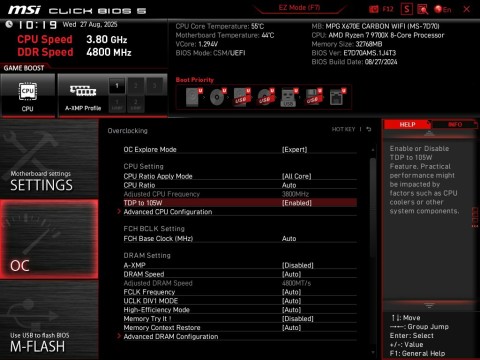
By default, the TDP value for the Ryzen 7 9700X and Ryzen 5 9600X models is fixed at 65 watts. In the latest version of UEFI, there is a new menu item in the OC section, which allows you to increase it to 105 watts. According to the Tom portal, s Hardware, when tested in Cinebench R23, the Ryzen 7 9700X chip, running at “increased rpm”, scored 13% higher points (23,153 versus 20,409 with a 65-watt limit).
-
Convenience:
The “Turbo button” provides a quick and easy way to engage overclocking, especially for those who want a one-touch boost to their system performance.
-
BIOS Control:
The overclocking process is still controlled by the BIOS, not the button itself. The button likely sets specific BIOS parameters to enable the desired overclock.
-
Not a Feature for Everyone:
Not all MSI motherboards have this button, and it’s not a substitute for proper cooling or understanding the limitations of overclocking.
-
Enhanced Turbo:
Some MSI motherboards, like the ones tested by Tom’s Hardware, have an “Enhanced Turbo” feature that effectively runs the processor at its maximum Turbo Boost frequency, similar to what the button might achieve.
While MSI has enhanced the overclocking experience for AMD Ryzen processors with features like “Performance Switch” and “PBO Enhanced Mode,” it doesn’t offer a physical “turbo button” on the motherboard itself. These features are accessed and configured through the MSI BIOS settings.
Here’s a more detailed explanation:
-
Performance Switch:
MSI offers multiple levels of overclocking presets, combining AMD’s Precision Boost Overdrive (PBO) with MSI’s custom settings.
-
PBO Enhanced Mode:
This feature builds on PBO to further optimize the CPU’s performance, potentially boosting Cinebench R23 scores by 10-15%.
-
Accessing these features:
These overclocking enhancements are accessed and configured within the MSI BIOS, not through a physical button on the motherboard.
In summary, while MSI may include a “Turbo button” for convenience, the actual overclocking process, especially for AMD Ryzen processors, is still managed within the BIOS settings, and the button acts as a shortcut to activate certain overclocking profiles.
MSI is excited to announce enhancements to its BIOS, including two powerful memory tuning options and the new OPP (Optimized Performance Profile). These features are designed to provide users with unparalleled flexibility and performance optimization.
The first feature, “Memory Try It!” offers a quick and straightforward way to enhance memory performance. Users can select a profile from the dropdown menu and test it out. This feature automatically identifies the RAM chip and provides suitable overclocking profiles, including high-frequency and tight-timing options. With “Memory Try It!,” users can explore various high-frequency and tight-timing profiles directly within the BIOS, unlocking the full potential of their memory modules.
The second feature, “High Efficiency Mode,” is MSI’s exclusive tuning software tailored to boost gaming performance. This innovative mode optimizes popular memory modules by increasing bandwidth and reducing latency. “High-Efficiency Mode” offers four distinct RAM timing settings: Tightest, Tighter, Balance, and Relax. This allows users to find the optimal configuration based on their memory module quality, ensuring a perfect blend of performance and stability.
AMD is introducing its latest memory-optimizing solution, the Optimized Performance Profile (OPP). This cutting-edge feature is designed to enhance the performance for AMD Ryzen 9000 Series processors by identifying the optimal memory frequency sweet spot at DDR 6000MHz.
The OPP leverages the existing EXPO profile on the memory DIMM, automatically converting it to the ideal speed and timing that perfectly pairs with the CPU on the motherboard. This innovative approach allows AMD to push memory speed and timing profiles to new heights, ensuring maximum performance and stability. With OPP, users can experience the full potential of their systems, achieving a new level of efficiency and reliability.
There is no official information about the new feature on the websites of MSI and AMD itself. Probably, the company included it in the AGESA 1.2.0.1a Patch A firmware before the corresponding announcement. Most likely, other
PC hardware manufacturers will offer a similar option in the near future.
With the upcoming AMD Ryzen 9000 Series processors, AMD has introduced several innovative software tools to enhance performance and stability. Memory Overclocking On The Fly (OC OTF) is designed to provide a seamless transition into the OS by combining overclocking modes with MSI’s default memory training. Once OC OTF is enabled in the BIOS, users can effortlessly switch between JEDEC and EXPO memory speeds using Ryzen Master Software.
This functionality ensures stability for critical workloads by operating at industry-standard JEDEC timings while allowing gamers to benefit from the faster, albeit potentially riskier, EXPO timings during off-hours. Additionally, this feature is invaluable for world record overclockers, enabling them to safely boot into Windows with aggressive timings and then switch over for validation. With OC OTF, users can experience enhanced performance without compromising stability or convenience.